

Have you ever tried to assess the file sizes – is 500 KB large enough or why does the 2 GB download consume so much space? The problem is that file sizes become complicated when one moves between KB, MB, GB and TB, especially when various devices and different storage media employ these units differently.
Understanding the meanings of these numbers will allow you to estimate the required amount of the memory, to understand why your disk is full or to measure the sizes of your files. In this guide, we will provide you with the explanation of file sizes, comparisons and conversions between KB, MB, GB and TB as well as an understanding of decimal and binary measuring systems.
What Is File Size?
File size is defined as the total volume of digital information stored within the file along with the storage space occupied by the file on the computer, phone, or any other storage media. File sizes are generally measured in terms of bytes (B), KB, MB, GB, and TB.
The file size will vary from one file to another depending on the file contents and formats. For instance, a text file will occupy a very small size such as KBs, while a video file will occupy very large file sizes such as GBs. Knowing your file sizes can also help you free disk space and manage your available storage more effectively.
Understanding File Size Units
File sizes are expressed using different units depending on how much data a file contains. Understanding these units makes it easier to compare files and know how much storage they require.
Bit and Byte
A bit is the smallest unit in digital information and it has values of either 0 or 1. One byte is formed by eight bits and it is a common unit that is used when calculating the file size.
Sometimes there may be confusion when using measuring units since:
- As per decimal system, 1 kilobyte (KB) = 1,000 bytes.
- As per binary system, 1 kibibyte (KiB) = 1,024 bytes. .
However, the binary system is used by computers and KiB is the right unit for 1,024 bytes. Computers, websites and storages, however, still use KB to stand for 1,024 bytes. This makes there be two ways of using KB creating confusion among many people.
It is also important not to confuse bytes and bits. File size is measured in bytes while internet speed is measured in bits per second, e.g. Mbps.
Kilobyte (KB)
A kilobyte (KB) is a small unit of digital data used for files that contain relatively little information. Simple text files, basic documents and some small images can often be measured in KB.
In binary measurements:
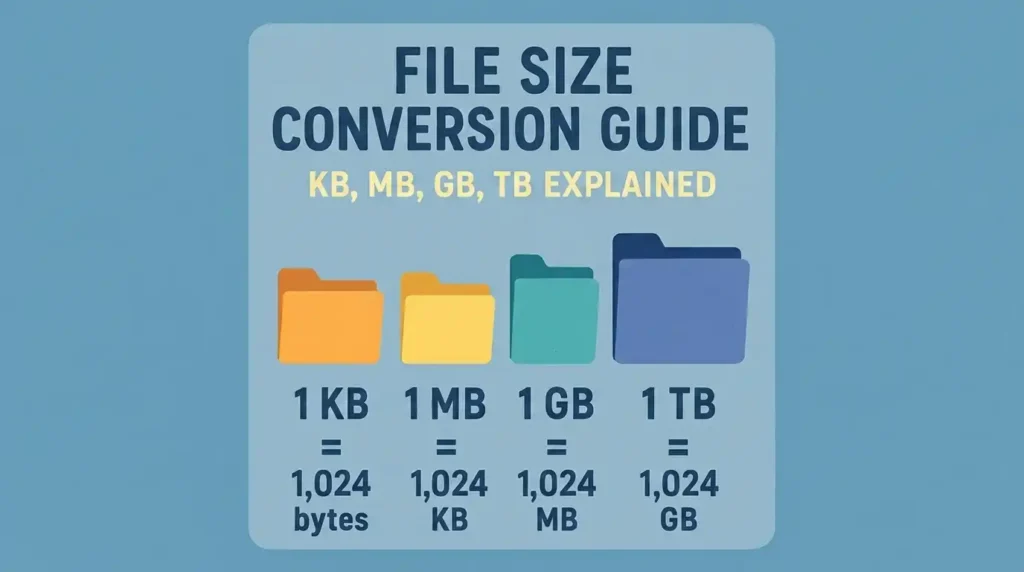
- 1 KB = 1,024 bytes
Megabyte (MB)
A megabyte (MB) is larger than a kilobyte and is commonly used for files that contain more data. Photos, PDFs, music files and some software files are often measured in MB.
In binary measurements:
- 1 MB = 1,024 KB
- 1 MB = 1,048,576 bytes
Gigabyte (GB)
A gigabyte (GB) is larger than a megabyte and is commonly used for larger files and storage. High-resolution videos, computer games, software updates or installations and large data transfer and backups can often be measured in GB.
In binary measurements:
- 1 GB = 1,024 MB
- 1 GB = 1,073,741,824 bytes
Terabyte (TB)
A terabyte (TB) is larger than a gigabyte and is commonly used for very large amounts of data and storage. Hard drives, SSDs and external storage devices are often available in capacities measured in TB.
In binary measurements:
- 1 TB = 1,024 GB
- 1 TB = 1,099,511,627,776 bytes
File Size Conversion: KB, MB, GB and TB
Quick File Size Conversion Chart
The following chart shows the commonly used decimal measurements alongside their binary equivalents. In everyday computing, you may still see KB, MB, GB and TB used for binary values, although KiB, MiB, GiB and TiB are the technically correct binary terms.
| File Size | Decimal Measurement | Binary Measurement |
| 1 KB / KiB | 1,000 bytes | 1,024 bytes |
| 1 MB / MiB | 1,000 KB | 1,024 KiB |
| 1 GB / GiB | 1,000 MB | 1,024 MiB |
| 1 TB / TiB | 1,000 GB | 1,024 GiB |
How Many KB in a MB?
In the decimal system, 1 MB = 1,000 KB. In the binary system, the technically correct relationship is 1 MiB = 1,024 KiB. However, you may still see MB and KB used for binary values in computers and software. To convert KB to megs or megs to KB, the calculation:
For Decimal System:
- KB to MB: Divide the KB value by 1,000. E.g., 5,000 KB ÷ 1,000 = 5 MB
- MB to KB: Multiply the MB value by 1,000. E.g., 5 MB × 1,000 = 5,000 KB
For Binary System:
- KiB to MiB: Divide the KB value by 1,024. E.g., 5,000 KiB ÷ 1,024 ≈ 4.88 MiB
- MiB to KiB: Multiply the MB value by 1,024. E.g., 5 MiB × 1,024 = 5,120 KiB
How Many MB in a GB?
In the decimal system, 1 GB = 1,000 MB. In the binary system, the technically correct relationship is 1 GiB = 1,024 MiB. However, you may still see GB and MB used for binary values in computers and software. To convert between Megabytes and Gigabytes:
For Decimal System:
- MB to GB: Divide the MB value by 1,000. E.g., 5,000 MB ÷ 1,000 = 5 GB
- GB to MB: Multiply the GB value by 1,000. E.g., 5 GB × 1,000 = 5,000 MB
For Binary System:
- MiB to GiB: Divide the MiB value by 1,024. E.g., 5,000 MiB ÷ 1,024 ≈ 4.88 GiB
- GiB to MiB: Multiply the GiB value by 1,024. E.g., 5 GiB × 1,024 = 5,120 MiB
How Many GB in a TB?
In the decimal system, 1 TB = 1,000 GB. In the binary system, the technically correct relationship is 1 TiB = 1,024 GiB. However, you may still see TB and GB used for binary values in computers and software. To convert between Gigabytes and Terabytes:
For Decimal System:
- GB to TB: Divide the GB value by 1,000. E.g., 5,000 GB ÷ 1,000 = 5 TB
- TB to GB: Multiply the TB value by 1,000. E.g., 5 TB × 1,000 = 5,000 GB
For Binary System:
- GiB to TiB: Divide the GiB value by 1,024. E.g., 5,000 GiB ÷ 1,024 ≈ 4.88 TiB
- TiB to GiB: Multiply the TiB value by 1,024. E.g., 5 TiB × 1,024 = 5,120 GiB
File Sizes from Smallest to Largest
File sizes follow a simple order, with each unit representing a larger amount of data than the one before it. While KB, MB, GB and TB are the units you will encounter most often, larger units are used when measuring extremely large amounts of data.
| File size unit | Description |
| Bit (b) | The smallest unit of digital data, represented as 0 or 1. |
| Byte (B) | 8 bits make up one byte and it is commonly used to measure file size. |
| Kilobyte (KB) | A small amount of data, often used for simple text files and small documents. |
| Megabyte (MB) | A larger unit commonly used for photos, PDFs, music and other files. |
| Gigabyte (GB) | Used for larger files such as videos, software, games and storage capacity. |
| Terabyte (TB) | Used for large amounts of data, particularly hard drives, SSDs and backups. |
| Petabyte (PB) | A very large amount of data, mainly used for large-scale data storage and data centres. |
| Exabyte (EB) | An extremely large amount of data used when measuring data at massive scales. |
| Zettabyte (ZB) | A huge data measurement generally used for global or large-scale digital data. |
| Yottabyte (YB) | One of the largest commonly recognised data units, used for exceptionally large amounts of data. |
Why Are File Sizes Sometimes Measured Differently?
Decimal vs Binary Measurements
The difference is not only about the numbers used for conversion. The two systems are also used in different situations, which is why the same storage device or file can sometimes appear to have a slightly different size.
| Decimal system | Binary system |
| Uses 1,000 as the base between units. E.g., 1 MB = 1000 KB | Uses 1,024 as the base between units. E.g., 1 MiB = 1024 KiB |
| Commonly used by storage manufacturers | Commonly used by computer systems and software |
| Used when manufacturers advertise SSD, HDD, USB and memory-card capacities | Used when some operating systems and software calculate or display storage |
| Uses KB, MB, GB and TB | The correct technical term is KiB, MiB, GiB and TiB but KB, MB, GB and TB are often used. |
KB vs KiB, MB vs MiB, and GB vs GiB
The difference between these units can be confusing because KB, MB and GB are often used even when a computer is working with binary measurements. However, the technically correct names for binary units are KiB, MiB and GiB.
- KB vs KiB: 1 KB = 1,000 bytes, while 1 KiB = 1,024 bytes.
- MB vs MiB: 1 MB = 1,000,000 bytes, while 1 MiB = 1,048,576 bytes.
- GB vs GiB: 1 GB = 1,000,000,000 bytes, while 1 GiB = 1,073,741,824 bytes.
In everyday computing, software may still display KB, MB or GB for values calculated using 1,024. For example, a computer may show a file as 1 MB, even though it is using a binary measurement behind the scenes. This is why the terms can sometimes appear to be used interchangeably.
Understanding File Size and Storage Capacity
File size shows the amount of space required for that particular file whereas the storage capacity is the measure of the amount of information that can be stored on the device. An example of 5GB video is a file whereas a 1TB SSD is a storage device which can store various files till the available space runs out. In case you have a large amount of vital data then backing up your data ensures that it is protected from any damage in future.
Storage devices like SSDs, HDDs, USB drives and memory cards are commonly measured using GB or TB units. When deciding whether to choose SSDs and HDDs, consider their storage capacities, speed and usage. Moreover, the actual amount of space visible on your computer will be slightly less than what is mentioned in its capacity.
What Are the Typical Sizes of Common Files?
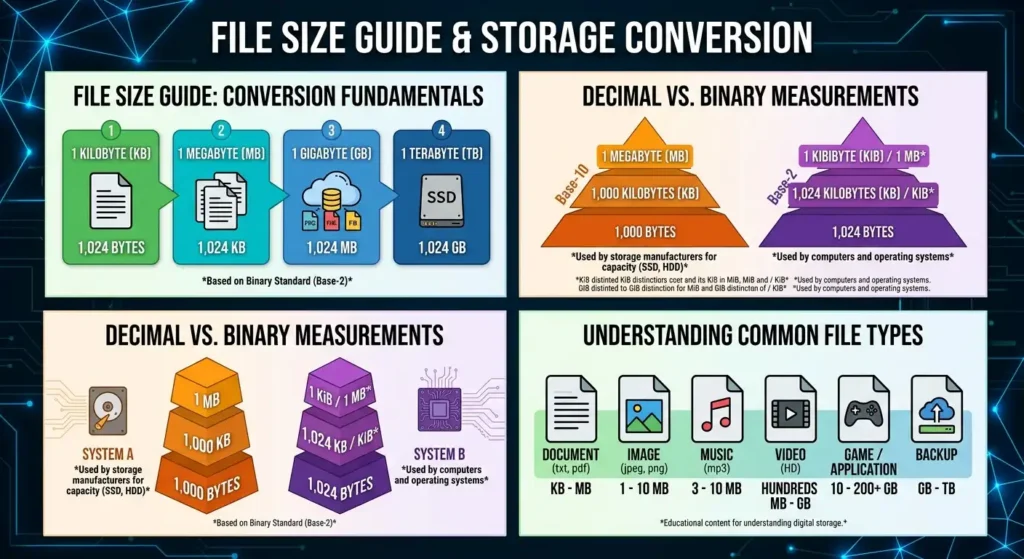
File sizes vary depending on the file format, quality, resolution, compression and amount of content. The ranges below give a general idea of how much space different types of files may require.
| Common file type | Typical file size |
| TXT file | A few KB |
| Word document (DOCX) | 10 KB–10 MB |
| 100 KB–20+ MB | |
| Excel spreadsheet | 10 KB–10+ MB |
| PowerPoint presentation | 1 MB–100+ MB |
| JPEG/PNG image | 1–10+ MB |
| MP3 audio file | 3–10 MB |
| HD video | Hundreds of MB to several GB |
| Computer game | 10–200+ GB |
| Backup file | Several GB to TB |
These are general ranges rather than fixed sizes. The same type of file can be much smaller or larger depending on its contents, quality, resolution, compression and other factors.
Conclusion
Understanding file sizes makes it easier to manage your storage, move important files and choose the right amount of space for your computer. Whether you are working with a few KB of documents or hundreds of GB of videos and games, knowing how KB, MB, GB and TB relate to each other can help you make better decisions about your data.
If you are running out of storage, Computer Mechanics can help with laptop computer upgrades to increase your available space and if you have lost some important files or accidentally deleted them, our data recovery services can help you recover them.
Frequently Asked Questions
1. Is 1 GB 1,000 MB or 1,024 MB?
It depends on the measurement system being used. In the decimal system, 1 GB = 1,000 MB. In the binary system, the technically correct relationship is 1 GiB = 1,024 MiB. However, computers and software may still use GB and MB when displaying binary-based values, which is why you may see both numbers used.
2. What Is the Largest File Size Unit?
Among the commonly recognised data units, the yottabyte (YB) is the largest. The order continues beyond terabytes as TB → PB → EB → ZB → YB. Yottabytes represent extremely large amounts of data and are far beyond the storage capacity of typical personal computers.
3. Is KB Bigger Than a MB?
No. MB is larger than KB. In the decimal system, 1 MB = 1,000 KB, while in the binary system, 1 MiB / MB = 1,024 KiB. So if you are comparing a kilobyte with a megabyte, the megabyte always represents the larger amount of data.
4. How Is File Size Measured?
File size is measured in units of digital data, starting with bytes and progressing to larger units such as KB, MB, GB and TB. The size of a file depends on the amount of data it contains, while the measurement can be expressed using either decimal or binary units.
5. What Comes After TB?
After terabyte (TB), the commonly used larger data units are:
Petabyte (PB) → Exabyte (EB) → Zettabyte (ZB) → Yottabyte (YB)
These units are mainly used to describe very large amounts of data rather than individual files on everyday computers.
