

High performance always comes at a cost, and in computing, that cost is heat.
Have you ever been in the middle of playing a game, adding complex animations to your video, or multitasking on your device, such as streaming and gaming or opening up dozens of tabs for your research? Suddenly, the performance you were getting drops, your inputs feel laggy, and you hear your fan going off like a helicopter that’s about to take off.
The thing you’re experiencing is your device activating its last line of defence in a protective mechanism called thermal throttling. In this guide, we will cover everything you need to know about thermal throttling, why it happens, how to fix it, and how to avoid it in the future.
What Is Thermal Throttling?
Thermal throttling, an important concept in computing terms, is a built-in automatic safety mechanism where components such as the CPU and the GPU reduce their power consumption and clock speed when the temperature exceeds a certain set threshold.
This reduction in the processor’s clock speed decreases the amount of heat generated, allowing the CPU to begin cooling down to safer operating temperatures. However, this comes at the cost of reduced performance.
Common Devices Affected By Thermal Throttling
In this day and time, most electronic devices rely on powerful processors in order to deliver high performance and provide a satisfying user experience. With the use of these powerful processors, these devices can handle intensive tasks, which in turn generate heat, and when the temperature exceeds a safe threshold, thermal throttling comes into action.
Some of the most common devices affected by thermal throttling include:
- Desktop PCs
- Laptops
- High-performance smartphones
- Tablets
- High-performance ultrabooks and thin devices
Why Modern CPUs and GPUs Use Thermal Throttling
- Prevents Overheating: Modern processors generate a lot of heat during heavy taskloads or prolonged continuous activities, which results in overheating. Thermal throttling helps prevent temperatures from exceeding set thresholds and reaching dangerous levels.
- Protects Hardware Components: Excessive heat generation in devices can cause damage to the internal components of the CPU or GPU. In order to avoid such damage, thermal throttling reduces clock speed which reduces the amount of heat generated and helps keep the temperature within safe limits.
- Maintain System Stability: When temperature rises above set thresholds, the device is likely to experience system crashes, pc freezing randomly or unexpected shutdowns. Thermal throttling ensures the system remains stable under load.
- Automatically Manage Performance: The temperature sensors built into the systems enable them to continuously monitor heat generation and adjust the performance of the system automatically based on data without the need for human intervention.
CPU vs GPU Thermal Throttling
| Feature | CPU Thermal Throttling | GPU Thermal Throttling |
| Purpose | Protects the CPU from overheating | Protects the GPU from overheating |
| Trigger | High CPU temperatures during multitasking, heavy apps or sustained workloads | High GPU temperatures during gaming, rendering or GPU-intensive tasks |
| How It Works | Reduces CPU clock speed and power consumption | Reduces GPU clock speed, power and sometimes memory speed |
| Impact on Performance | Slower processing, delayed program execution | Lower frame rates (FPS), stuttering in graphic-intensive applications |
| Cooling Dependency | Affected by CPU cooler efficiency and airflow in cases of desktops and laptops | Affected by GPU cooler efficiency, airflow and VRAM cooling |
| Detection Tools | HWMonitor, Intel XTU, Ryzen Master | MSI Afterburner, CPU-Z, NVIDIA/AMD monitoring software |
| Duration | Often short bursts; may self-correct automatically | Can last longer during intensive graphics tasks |
Key Causes of Thermal Throttling
- Dust Accumulation: Dust buildup on heatsinks and cooling fans reduces the flow of air and keeps the heat from escaping.
- Inadequate Cooling Solutions: Low-quality fans and cooling solutions struggle to manage heat during high-performance tasks, causing the CPU or GPU to throttle. A loud laptop fan is often the first sign your cooling solution needs attention.
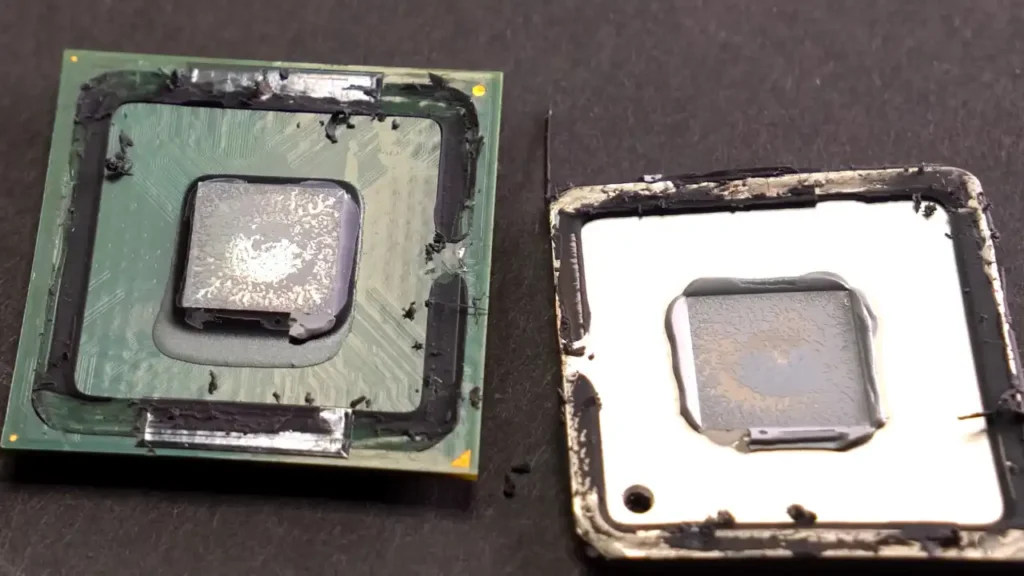
- Aged or Poorly Applied Thermal Paste: Heat transfer from the processor to the heatsink is facilitated by thermal paste. Cooling efficiency is lowered if it dries out or was applied incorrectly.
- Overclocking and High Voltage: Overclocking and running components above their default specifications generate extra heat, increasing the likelihood of thermal throttling.
- High Ambient Temperatures: Operating in an area with high heat or under direct sunlight limits the ability of cooling systems to dissipate heat effectively.
- Poor Airflow in Casing: Small, cluttered and poorly ventilated cases that have small inlet and outlet vents can trap hot air, forcing components to throttle.
- Defective or Component Failure: A broken or failed liquid cooling pump will immediately affect cooling, leading to overheating and throttling.
How Does Thermal Throttling Work?
Modern processors (CPUs) and graphics processors (GPUs) include thermal throttling in the working mechanism as a safety measure against heat damage. Here’s how it works step by step:
- Temperature Monitoring: Processors have built-in temperature sensors that constantly monitor the amount of heat generated.
- Detecting High Temperatures: When the processor exceeds a safe temperature threshold, the system recognises that continuing at full capacity could potentially cause damage to the hardware.
- Reducing Clock Speed: Upon detecting excessive temperatures and a potential danger to its components, the processor automatically reduces its clock speed and power consumption, generating less heat.
- Cooling Down: The reduction in clock speed and heat output allows the processor to gradually cool down to safer operating temperatures.
- Restoring Performance: Once the temperature drops to safe levels, the processor may increase its clock speed again to restore full performance.
Does Constant Thermal Throttling Damage Your CPU?
While thermal throttle itself is a protective mechanism designed to prevent immediate damage to the processor and its components, constant thermal throttling in the long run can eventually cause damage to the CPU or shorten its lifespan.
Occasional throttling is harmless. It is your CPU’s way of hitting the brakes to stay within the safe temperature range, typically around 95℃ to 100℃. However, problems can arise in the long term if your CPU is constantly at its thermal limit, causing it to suffer from gradual degradation.
Even though thermal throttling protects the CPU in the short term, constant operations at high temperatures can negatively impact overall system performance over time. Continual exposure to near-maximum thermal levels can degrade the processor’s efficiency, ultimately resulting in slower response time, longer task completion duration and reduced reliability under heavy workloads.
How to Prevent Thermal Throttling
In order to prevent or reduce the occurrence of thermal throttling, improvements are required in both hardware and software aspects.
Hardware Solutions
- Clean Your Device: Dust buildup in fans, heatsinks, and vents is the number one cause of high temperatures on devices that are a few years old. Proper removal of the buildup is often all it takes to drop temperatures by 10-20°.
- Upgrade Cooling Systems: Investing in a more efficient external cooling device, such as laptop cooling pads, external radiator units and vacuum heat sinks, can significantly reduce CPU temperatures.
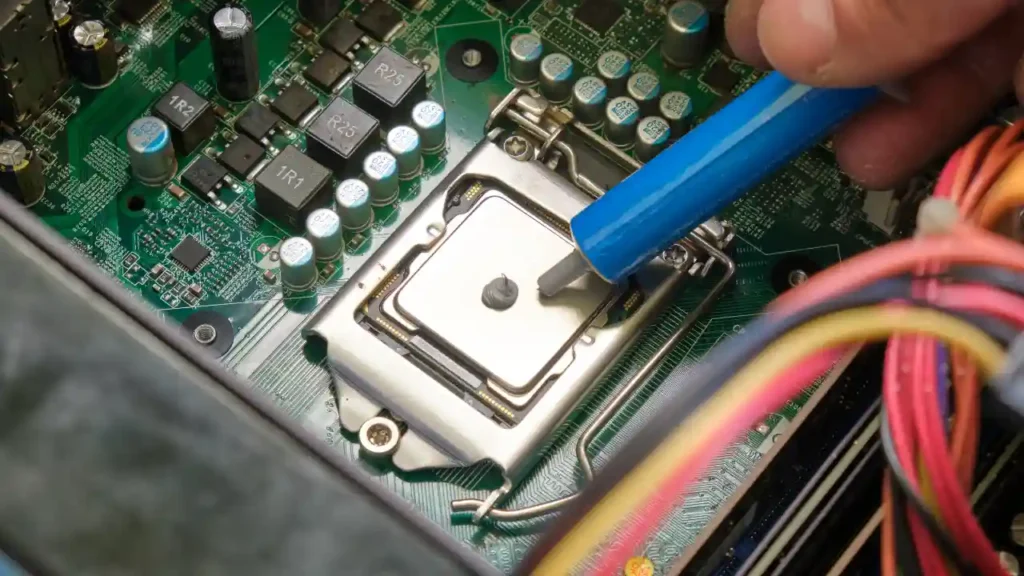
- Reapply Thermal Paste: The thermal paste between your CPU and cooler dries out over the years of use and loses its heat transfer efficiency. Replacing it with a fresh paste is a straightforward process that can make a significant temperature difference on older devices.
Software Solutions
- Check Your Fan Speed: If your CPU fan is running slower than expected or isn’t running at all, it can cause overheating and therefore lead to thermal throttling. If you’re experiencing such problems, Computer Mechanics in Perth provides expert computer and laptop repair services.
- Undervolting: By lowering the amount of voltage consumed by the CPU or GPU, you’re able to reduce the heat generated by the processor without compromising performance.
- Revert Overclocking: Reverting the component’s clock speed back to default specifications avoids excessive heat generation.
Conclusion
The built-in automatic safety mechanism, thermal throttling, is what your system activates as its last line of defence when the temperature exceeds safe thresholds. Although thermal throttling is a built-in mechanism and is there to protect your components, constant throttling in the long term could potentially cause damage to the processor and its components.
Frequently Asked Questions
1. What is thermal throttling?
Thermal throttling is a built-in automatic safety mechanism where the processor’s components reduce their clock speed when the temperature exceeds safe thresholds.
2. Why does thermal throttling happen?
Thermal throttling happens when the processor’s temperature exceeds safe thresholds. Some of the most common causes of thermal throttling include:
- Dust buildup
- Poor airflow/cooling
- Overclocking
- Poor thermal paste
- High-performance load
- High ambient temperatures
3. At what temperature does thermal throttling get activated?
Most modern processors activate thermal throttling when the temperature reaches 90℃ to 100℃.
4. How do you know if your pc is thermal throttling?
You can identify thermal throttling by signs such as sudden drops in FPS, reduced performance during heavy tasks, severe system lags accompanied by loud fan noises. To confirm, you can use monitoring software to check if temperatures are hitting the 90-100℃ range.
5. Does thermal throttling cause stuttering or FPS drops?
Yes, stuttering and a drop in FPS while gaming or running intensive tasks are common symptoms of thermal throttling. It happens because the CPU/GPU lower their clock speed in order to reduce the heat generated, which results in performance being compromised.
6. How to fix thermal throttling?
There could be many reasons as to why your device is thermal throttling. Each reason has its own fixes. Some of the most common fixes include:
- Clean the device in case of dust buildup
- Invest in efficient external cooling devices
- Improve airflow
- Reapply thermal paste every 2-5 years, depending on the quality and usage conditions
- Revert overclocking and undervolt
7. Does thermal throttling damage the CPU?
Occasional thermal throttling does not damage the CPU, but constant thermal throttling in the long run could potentially damage the CPU and its components.
8. Can thermal throttling occur on GPUs as well?
Yes, thermal throttling can occur on GPUs as well. It works in the same way as it does on CPUs.
